In a previous article I explained how to change the free Analog log analyzer to recognize Windows Vista. Now as I start to develop websites for the iPod Touch and the iPhone, I also wanted to see those user agents in my Analog reports.
Therefore I modified the tree.c source file of the Analog Source as shown below:
    /* Now non-Windows operating systems */
    else if ((c = strstr(whole, "Mac")) != NULL) {
        if((c = strstr(whole, "PPC")) != NULL)
                        *name = "Macintosh:PPC";
                else if ((c = strstr(whole, "Intel")) != NULL)
                        *name = "Macintosh:Intel";
                else if ((c = strstr(whole, "PowerPC")) != NULL)
                        *name = "Macintosh:Classic";
                else if ((c = strstr(whole, "iPod")) != NULL)
                        *name = "Macintosh:iPod";
                else if ((c = strstr(whole, "iPhone")) != NULL)
                        *name = "Macintosh:iPhone";
                 else
                        *name = "Macintosh:Unknown Macintosh";
         }
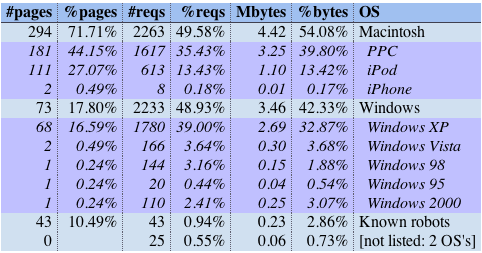
After compiling and installing Analog again, I get those user agents listed nicely in my Analog reports:
Step by step:
- Download the Analog source tarball from the Analog site or HMUG (preferred)
- Extract the tarball to a local directory (
gunzip analog-6.0.tar.gz ; tar -xvf analog-6.0.tar) - open the Terminal application,
cdto the newly created analog directory - find the file src/tree.c and modify it with the correct iPhone/iPod code
- type
make - type
./install.shif you downloaded the HMUG port - run Analog and see if iPod’s or iPhone’s have been to your site…